Review Comments (1) Screenshots (1) Questions & Answers (0) Votes (1) Awards (10) Wiki  
(1)
ALMA Labs
1.5.1
wisedesktop.com
$17.95  Purchase
31 people
Download WiseDesktop

1.12 MBDownloaded 323 times

This software was checked for viruses 6 months ago and was found to contain no viruses.
Click here to see antivirus report.
 

Review

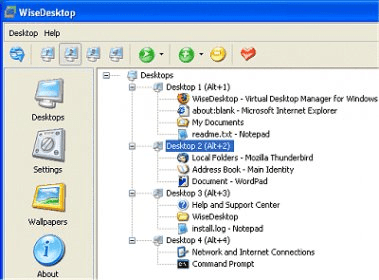
WiseDesktop is an award-winning virtual desktop manager for Windows with user-friendly interface and useful features. WiseDesktop creates four virtual desktops and only one is visible at a time. So, when you switch desktops, all visible application windows just disappear from the screen and from the Windows taskbar. It is possible to quickly change the "active" desktop by using keyboard hotkey, system tray icon or WiseDesktop deskband.
Also you can set custom wallpapers for each desktop, move application windows from one desktop to another by drag'n'drop, keep an application window on all desktops, close an application window from the WiseDesktop main window, change the order of applications on the Windows taskbar etc.
WiseDesktop deskband is a toolbar on the Windows taskbar. It can be used for quickly switching between virtual desktops and running applications by one click.
Be wise enough to choose WiseDesktop for organizing your desktop!

What's new in version 1.5

- WiseDesktop Deskband - toolbar on the Windows taskbar for switching between desktops and applications;
- Ability to set custom wallpapers for each desktop;
- Ability to change number of desktops;
- Added hotkey for the WiseDesktop main window;
- Some user interface improvements;
Report a wrong version Report a wrong program title Suggest a correction

Screenshots

Main Window Main Window

Latest comments

Henry Menson(beginner) 2 years ago 
Outstanding! An easy solution to keeping 4 desktops seperated. Easy click-drag method of moving applications between desktops, or even closing or 'copying' them. Usually when XP crashes (reloads Explorer) the systray icon disappears along with the 4 WiseDesktop taskbar buttons, but the Alt-# function still toggles between the virtual desktops, allowing me to properly close all applications before rebooting the Windows system.
Reply
Add new comment

E-mail Address:

Password:

Register now »

Forgot password?

Sign in with:
Download Software Informer Client
Copyright © 2012, Informer Technologies, Inc. About| Privacy and terms| Help| Feedback & Support| Partners program